WP Site Optimizer — Speed, Security & SEO in One Scan
A free WordPress plugin that audits your site for speed, security, and SEO issues, then safely auto-fixes the easy wins — built and maintained by Adnan WebSolutions.
See WP Site Optimizer in Action
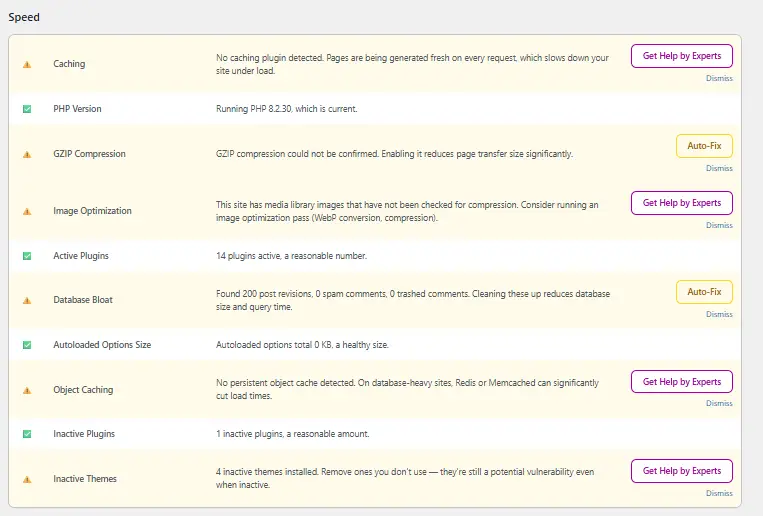
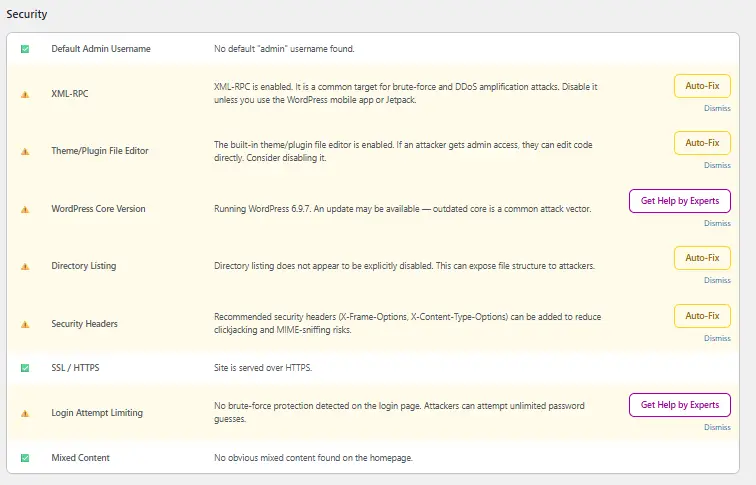
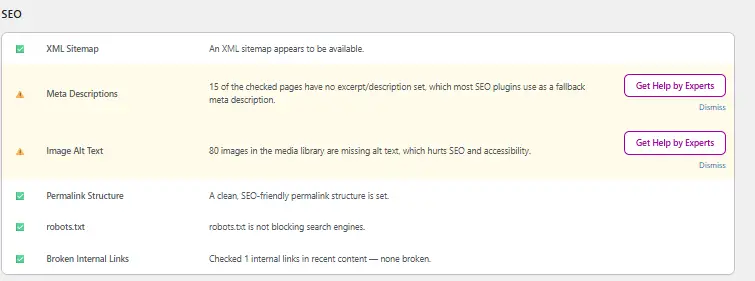
A quick look at the three audit dashboards — speed, security, and SEO — each with a plain-language breakdown of what's wrong and how to fix it.
Every Audit, Broken Down by Category
WP Site Optimizer runs its checks locally on your server — no third-party APIs like PageSpeed Insights or external blocklist services involved.
Performance Audit
Flags render-blocking assets, bloated autoload data, missing caching, and other issues slowing your pages down.
One-Click Safe Fixes
Applies low-risk fixes automatically — the rest are explained clearly so you decide what to change.
Object Caching Check
Detects whether object caching is active and recommends setup steps if it isn't.
SSL & HTTPS Check
Confirms your site is fully served over HTTPS and flags any mixed-content warnings.
Login Attempt Limiting
Checks whether brute-force protection is in place on your login form and helps you enable it.
Unused Plugin & Theme Audit
Surfaces inactive plugins and themes sitting on your server as unnecessary attack surface.
On-Page SEO Basics
Reviews titles, meta descriptions, and heading structure for common on-page SEO gaps.
Broken Link Detection
Scans internal links and flags broken ones before they cost you rankings or user trust.
Score History & Trends
Tracks your site's score over time so you can see whether things are improving after each fix.
Install and Run Your First Scan in Minutes
Download & Install
Download the .zip and upload it under Plugins → Add New → Upload Plugin in your WordPress dashboard.
Activate
Activate WP Site Optimizer from your Plugins list — no configuration needed to get started.
Run a Scan
Open the plugin dashboard and run your first audit across speed, security, and SEO.
Review & Fix
Apply the safe one-click fixes, and work through the rest at your own pace.
Frequently Asked Questions
Is WP Site Optimizer really free?
Yes. The core plugin — speed, security, and SEO audits plus safe auto-fixes — is free to download and use.
Does it slow down my website?
No. Scans run on demand, not continuously in the background, and all checks are local PHP-level checks with no external API calls.
Is it safe to use on a live site?
Yes. WP Site Optimizer only auto-applies fixes it considers low-risk. Anything more involved is flagged for you to review first.
What WordPress version does it require?
WP Site Optimizer works on WordPress 5.8 and above, on any standard hosting environment that supports PHP.
Where can I get help if I run into an issue?
Reach out to the Adnan WebSolutions team directly — see the button below.
Ready to Optimize Your Site?
Download WP Site Optimizer and run your first audit today.
Download Now — It's Free